
Revenue Cloud Sandbox Guide
If you’ve worked with CPQ, you know how critical sandbox testing is before deploying pricing rules to production. Revenue Cloud is no different. In this guide, I’ll walk you through choosing the right sandbox type, managing test data, and avoiding the common pitfalls I’ve seen on Revenue Cloud implementations.
Sandbox Types Overview
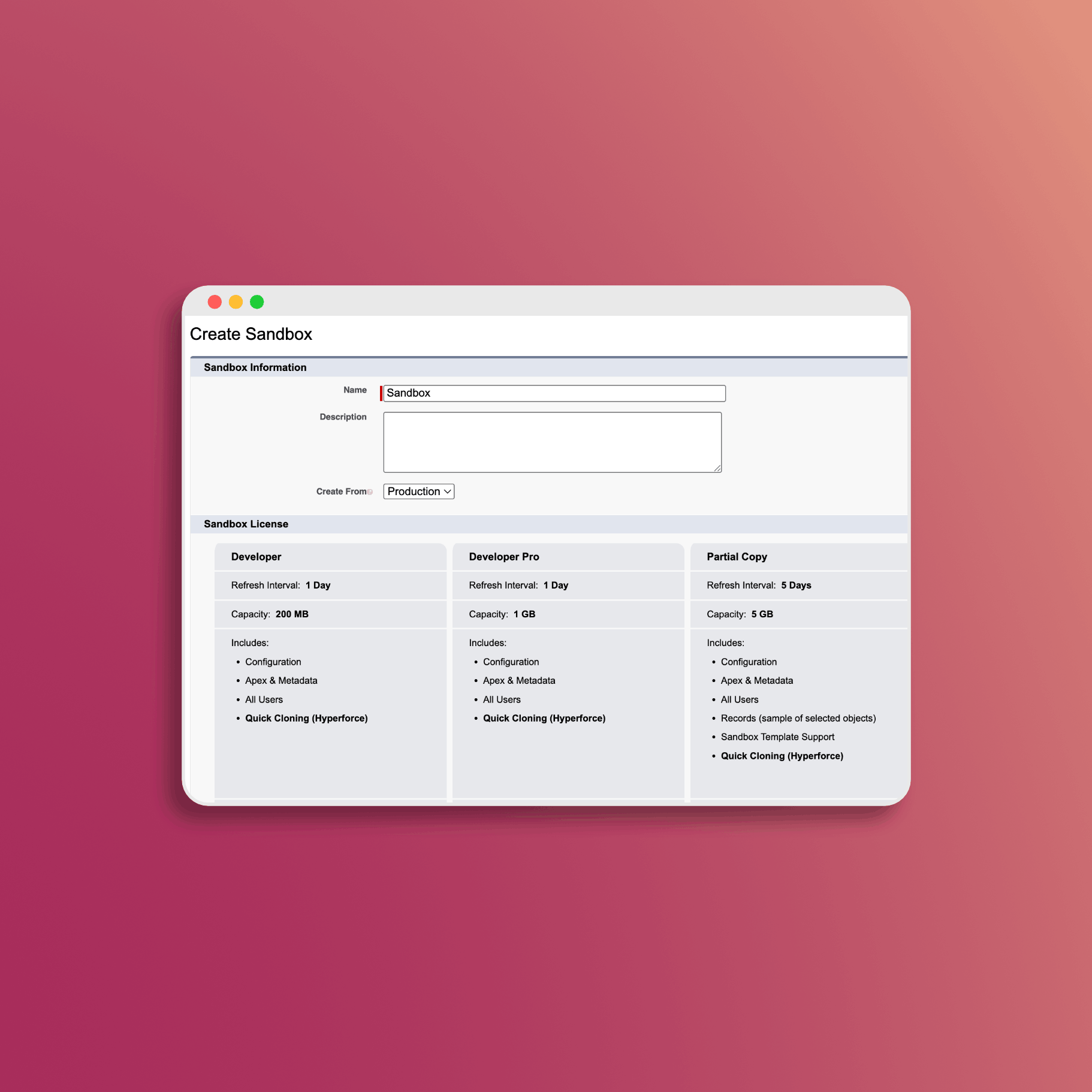
Salesforce offers four sandbox types, each with different capabilities and refresh intervals (official documentation).
Developer Sandbox
| Attribute | Details |
|---|---|
| Storage | 200 MB data, 200 MB files |
| Refresh Interval | Once per day |
| Contents | Full copy of production metadata only (no data) |
Best For: Individual development, testing new features, fixing bugs
Revenue Cloud Use Case: Initial configuration testing, experimenting with pricing rules, learning the platform without affecting shared environments.
Developer Pro Sandbox
| Attribute | Details |
|---|---|
| Storage | 1 GB data and files |
| Refresh Interval | Once per day |
| Contents | All metadata (reports, dashboards, price books, products, apps, customizations); NO object records |
Best For: Larger projects, concurrent testing with multiple developers
Revenue Cloud Use Case: Testing product catalog configurations, building pricing procedures, developing custom components.
Partial Copy Sandbox
| Attribute | Details |
|---|---|
| Storage | 5 GB |
| Refresh Interval | Every 5 days |
| Contents | Metadata plus sample data (up to 10,000 records per object) via sandbox templates |
Best For: Testing with realistic data, UAT environments
Revenue Cloud Limitation: Revenue Cloud data is not automatically copied to Partial Copy sandboxes. You must explicitly configure sandbox templates to include Revenue Cloud objects, and even then, the 5 GB limit and 10,000 records per object cap can be insufficient for production-like testing. Revenue Cloud implementations are extremely data-heavy - product catalogs, pricing configurations, and attribute definitions all live as data records, not metadata.
Full Copy Sandbox
| Attribute | Details |
|---|---|
| Storage | Equivalent to production |
| Refresh Interval | Every 29 days |
| Contents | Complete copy of production including all data |
Best For: Performance testing, load testing, final staging before deployment
Revenue Cloud Recommendation: If you have access to a Full Copy sandbox, use it for Revenue Cloud testing. This is the only sandbox type that reliably captures the complete Revenue Cloud data model - product catalogs, pricing procedures, attribute definitions, configuration rules, and all the complex object relationships. The 29-day refresh limit is a constraint, but the data completeness is worth it.
Sandbox Allocations by Edition
Your sandbox allocation depends on your Salesforce edition (see official allocations):
| Edition | Developer | Developer Pro | Partial Copy | Full Copy |
|---|---|---|---|---|
| Enterprise | 25 | - | 1 | Add-on |
| Unlimited | 100 | 5 | 1 | 1 |
| Performance | 30 | 5 | 1 | 1 |
Note: Enterprise Edition doesn’t include Developer Pro sandboxes or Full Copy sandboxes by default - these require additional purchase.
Creating a Revenue Cloud Sandbox
Step 1: Navigate to Sandbox Setup
- Go to Setup > Environments > Sandboxes
- Click New Sandbox
Step 2: Configure Sandbox Details
- Enter a Name (e.g., “RevCloud-Dev” or “RevCloud-UAT”)
- Select the Sandbox Type based on your needs
- For Partial and Full Copy sandboxes, select a Sandbox Template to control data copying
Step 3: Create and Wait
- Click Create
- Sandbox creation can take from minutes (Developer) to hours (Full Copy)
- You’ll receive an email when the sandbox is ready
Why Revenue Cloud Makes Sandbox Strategy Critical
Before diving into data management, you need to understand why Revenue Cloud is different from standard Salesforce implementations.
Revenue Cloud stores configuration as data, not metadata. Your product catalog, pricing procedures, attribute definitions, configuration rules, and selling models are all stored as records in custom objects - not as metadata that automatically copies with every sandbox. This means:
- Change Sets won’t deploy your Revenue Cloud configuration
- Partial Copy sandboxes won’t include this data unless you explicitly configure templates
- Even with templates, the 10,000 record limit per object can truncate large product catalogs
- Object relationships are complex - Price Books must exist before Products can reference them
My recommendation: If you have a Full Copy sandbox available, prioritize it for Revenue Cloud work. If you’re limited to Partial Copy, be prepared to invest significant effort in sandbox template configuration and data validation.
Data Management Strategies
Using Sandbox Templates (Partial Copy Only)
If you must use Partial Copy sandboxes, you’ll need to carefully configure sandbox templates (see template documentation):
- Go to Setup > Environments > Sandbox Templates
- Create a template and include these Revenue Cloud objects at minimum:
- Product2 and PricebookEntry
- Product Catalog and Product Category objects
- Attribute Category and Attribute Definition objects
- Product Classification objects
- Pricing Procedure related objects
- Accounts and Contacts (sample set for testing)
- When you add child objects, Salesforce automatically includes parents to maintain relationships
Warning: Even with a well-configured template, you may hit the 10,000 records per object limit on large catalogs. Validate that your complete product hierarchy copied correctly after each refresh.
Data Masking and Anonymization
For sandboxes containing sensitive data:
- Implement data masking for customer information
- Anonymize payment and financial data
- Use Salesforce Data Mask or third-party tools
- Ensure compliance with data protection regulations
A Note on Data Seeding
You may see recommendations to seed sandbox data using Data Loader or Apex scripts. Be cautious with this approach for Revenue Cloud.
Revenue Cloud is extremely data-heavy. A typical implementation involves dozens of interconnected objects with strict dependency order requirements. For example:
- Price Books must exist before PricebookEntries
- Product Classifications must exist before Products can inherit attributes
- Attribute Categories must exist before Attribute Definitions
Manually seeding this data is error-prone and time-consuming. If your only option is Developer or Developer Pro sandboxes without production data, consider:
- Using specialized DevOps tools like Gearset, Salto, or Prodly that understand Revenue Cloud object dependencies
- Building a minimal “starter kit” data set that you maintain and version control
- Accepting that your testing environment won’t match production fidelity
// SandboxPostCopy can help with basic setup, but won't solve
// the fundamental data volume challenge
public class RevCloudSandboxSetup implements SandboxPostCopy {
    public void runApexClass(SandboxContext context) {
        // Useful for: permission set assignments, integration credentials
        // Not practical for: recreating entire product catalogs
    }
}
Sandbox Refresh Best Practices
Before Refresh
- Export any work in progress that hasn’t been deployed
- Notify team members to avoid losing uncommitted changes
- Document current configurations you want to preserve
- Back up custom data not in production
After Refresh
- Reassign permission sets for Revenue Cloud access
- Update integration credentials (sandbox endpoints differ)
- Verify pricing procedures are active
- Rebuild product indexes if needed
- Test critical workflows before resuming development
Testing Strategies for Revenue Cloud
Unit Testing
Use Developer sandboxes for:
- Testing individual pricing rules
- Validating product configurations
- Apex code development and testing
Integration Testing
Use Developer Pro or Partial Copy sandboxes for:
- Testing API integrations with external systems
- Validating data flows between Revenue Cloud and other Salesforce clouds
- End-to-end quote generation testing
User Acceptance Testing (UAT)
Use Full Copy sandboxes if available, otherwise Partial Copy with validated templates:
- Business user validation of quote workflows
- Training sessions with realistic data
- Process verification before production deployment
- Critical: Verify that your product catalog and pricing data copied completely before UAT begins
Performance Testing
Requires Full Copy sandbox:
- Load testing with production data volumes
- Performance validation of pricing calculations
- Stress testing quote generation with large bundles
- Do not attempt performance testing on Partial Copy - the limited data will give misleading results
Deployment from Sandbox to Production
Change Sets (Limited Use for Revenue Cloud)
Change Sets work for metadata, but not for Revenue Cloud configuration data:
What Change Sets CAN deploy:
- Custom fields and objects
- Flows and process automation
- Custom Lightning components
- Apex classes and triggers
What Change Sets CANNOT deploy:
- Product Catalog records
- Pricing Procedures (stored as data)
- Attribute Definitions
- Configuration Rules
- Product Classifications
For Revenue Cloud configuration, you’ll need Data Loader, specialized DevOps tools, or manual recreation.
Salesforce CLI / SFDX
For more control over deployments:
# Retrieve metadata from sandbox
sfdx force:source:retrieve -m CustomObject:Quote,Flow:PricingFlow

# Deploy to production
sfdx force:source:deploy -m CustomObject:Quote,Flow:PricingFlow -u production
DevOps Center
Salesforce DevOps Center provides:
- Visual change tracking
- Automated deployments
- Built-in conflict resolution
- Pipeline management
Common Sandbox Issues and Solutions
Issue: Revenue Cloud Data Missing After Refresh
Solution: For Partial Copy sandboxes, verify your sandbox template includes all required Revenue Cloud objects. Check that you didn’t hit the 10,000 record limit on any object. For Developer/Developer Pro sandboxes, remember that no data copies - you’ll need to recreate or import it.
Issue: Missing Permission Sets
Solution: Permission Set Licenses may not transfer. Manually assign PSLs after sandbox creation. Check that Revenue Cloud permission sets are assigned to test users.
Issue: Integration Endpoints Failing
Solution: Update integration endpoints to use sandbox-specific URLs. Production credentials won’t work in sandbox.
Issue: Product Catalog Not Visible
Solution: Rebuild Product Index tables from Product Catalog Management Home. This is required after any sandbox refresh where product data changed.
Issue: Pricing Not Calculating
Solution: Ensure pricing data tables are refreshed, pricing procedures are activated, and the default pricing recipe is selected in org settings. Run “sync pricing data” after major data changes.
Issue: Object Relationship Errors During Data Load
Solution: Revenue Cloud has strict dependency order. Load data in this sequence: Price Books → Products → PricebookEntries → Attribute Categories → Attribute Definitions → Product Classifications → Product Category assignments.
Sandbox Cloning Strategy
Create a “golden” sandbox with your standard Revenue Cloud configuration:
- Set up a Developer Pro sandbox with baseline configuration
- Configure all standard settings and permission sets
- Clone this sandbox for new development work
- Reduces setup time for new team members or projects
Resources
Here are the official Salesforce resources for sandbox management:
- Sandbox Licenses and Storage Limits - Official storage and refresh limits
- Salesforce Editions and Feature Allocations - Sandbox counts by edition
- Sandbox Templates - How to configure data copying
- Partial Copy Sandbox Considerations - What copies and what doesn’t
- Revenue Cloud Data Model - Understanding Revenue Cloud object relationships
- DevOps Center - Deployment management
Conclusion
Revenue Cloud’s data-heavy architecture makes sandbox strategy more important than typical Salesforce implementations. The key takeaways:
- Use Full Copy sandboxes if you have them - they’re the only type that reliably captures complete Revenue Cloud data
- Partial Copy requires careful template configuration and validation that your data actually copied
- Change Sets won’t deploy Revenue Cloud configuration - you need Data Loader or specialized tools
- Don’t underestimate the data seeding effort if you’re working with Developer sandboxes
Plan your sandbox strategy early in your implementation. The 29-day Full Copy refresh limit means you need to coordinate testing windows carefully.
Revenue Cloud has the pricing engine. What it's missing: professional PDF templates, hosted quote links, and buyer acceptance tracking. SilkQuote closes that gap. Free on AppExchange, no code required:
- Generate - branded PDF quotes from any Opportunity in one click
- Host and share - prospects accept or decline directly in a browser, no Salesforce account needed
- Track - every open, view, acceptance, and decline logged to the Opportunity timeline
- Sign - DocuSign and Adobe Sign integration included
Free to install. Unlimited users and quotes. Deploys same day.
Get SilkQuote free on AppExchange →